


Lexington Herald-Leader | News
2.976.00 Reviews
App Specs
- Version
- 11.1.16
- Updated On
- License
- Free
- Downloads
- 10,000+
- Developer
- McClatchy
- Categories
- News & Magazines
- Platform
- Android
Screenshots
 Analysis by AppCompare
When a household wants one dependable place to check what is happening around Lexington, a local newspaper app can be more useful than a stream of national headlines. I tried Herald-Leader - Lexington KY with that everyday role in mind: a quick morning scan, a closer look at a story that affects the area, and a way to keep up with local sports and weather. The main appeal is its regional focus, though its modest user rating is a reason to approach it with realistic expectations rather than assume every part of the experience will suit everyone.
A shared morning check-in
Picture a household getting ready for the day. One person wants to know whether a local issue is developing, another checks sports, and someone else is mostly interested in weather before heading out. A locally focused news app can give each person a common starting point without requiring everyone to follow the same national news feed. I find that particularly useful when the conversation at breakfast is about what is happening nearby, not just the biggest story of the day.
For that kind of shared use, the app works best as a place to browse and compare what matters to different people. It is not necessary for everyone to read every article. One person can scan headlines, another can open a sports story, and they can share the useful details aloud. That is a simple workflow, but it keeps the app’s local coverage connected to everyday decisions and conversations.
Setting expectations on a household device
If several people use the same phone or tablet, I would treat it as a shared reading tool rather than assume that each person has a separate, private space inside it. Before making the app part of a household routine, decide who is responsible for any account or purchase choices and whether other family members should use the device for reading only. That small boundary matters more when an app offers paid options alongside free access.
The app is free to install, but in-app purchases range from $7.99 to $159.99 per item. I would not let a younger or less experienced device user make a purchase decision without the account holder checking what is being selected. This is not a reason to avoid the app; it is a sensible shared-device habit. If everyone in the household has different reading preferences or account arrangements, using separate devices may be more straightforward than trying to make one device serve every purpose.
Coordinating without turning news into noise
News is easier to follow when people agree on what deserves attention. I would use a quick scan of the local headlines as a shared check-in, then open only the stories that are relevant to a particular person. If someone is following a local issue, they can bring it up during the day; if another person is interested in a game, they can check the sports coverage separately. This keeps the app from becoming a constant interruption in a busy household.
Notifications can be useful when a reader wants timely updates, but they are also the setting I would approach most carefully on a shared device. A stream of alerts may distract everyone, while an alert appearing on a communal screen can draw attention to a topic the device user did not choose. I would start with only the notifications that matter to the main reader, then adjust if they prove too frequent or too broad. For a person who prefers to control when they read, opening the app at set times is a calmer alternative.
Worth Reading Before You Choose

EA SPORTS FC Mobile 26 Is a Bigger Football Game, but It Takes Time

Flipboard Shows What News Apps Must Do Beyond the Feed

Switching to Android Auto Means Rethinking Your Driving Routine

Google Calendar Makes a Crowded Week Easier to Manage

Ludo King Makes the Most of the Minutes Between Plans

Baby Panda World Brings Quick Play to Modern Phones, but Its Game Library Feels Busy
Age, trust, and the local-news role
The content rating is Everyone 10+, so I would consider the age and maturity of the actual reader rather than treat a general rating as a substitute for family judgment. News can include serious local events and subjects that prompt questions. A parent or caregiver who shares the app with a child may want to read alongside them and talk through stories that need context. That makes local coverage a possible conversation starter, but it does not mean every article will be suited to every young reader.
McClatchy develops the app, and the publication’s regional identity is central to its usefulness. I would use it for awareness of Lexington-area coverage, not as the only source for every subject or as a replacement for checking important details through the relevant local organization. A newspaper app gives readers a convenient way into reporting, while official notices and direct sources can be better for time-sensitive instructions or practical confirmations.
It has a 2.8 average from 189 ratings, with 10K+ installs. Those figures suggest that the app has found an audience but that the experience has not impressed every reviewer. I would keep that in mind if I were recommending it to someone who expects a flawless interface or a broad, fully personalized news service. Its clearest reason to install is narrower: having a convenient route to Lexington-focused reporting.
Using the app day to day
The app sits in the News & Magazines category and is free to download. It was released on July 6, 2011, and its current version is 11.0.6, with Android 8.0 as the minimum operating system. Those details make it easier to judge whether it fits an older device and to understand that the app has been around for years, while the current version number identifies the edition available now.
First off, downloading and installing the Herald-Leader - Lexington KY app was a breeze. Available on both Android and iOS, you can find it easily on the Google Play Store or the Apple App Store. The installation process was straightforward, and I was up and running in no time.
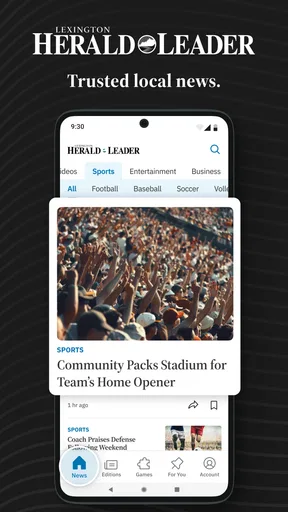
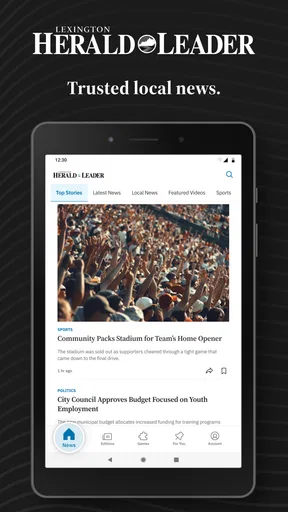
Once you open the app, you're greeted with a clean and intuitive interface. The home screen showcases the latest headlines, with categories like news, sports, entertainment, business, and opinion neatly organized. It's like having the pulse of Lexington right at your fingertips.
Features That Stand Out
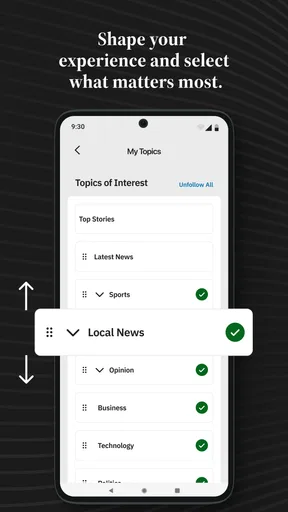
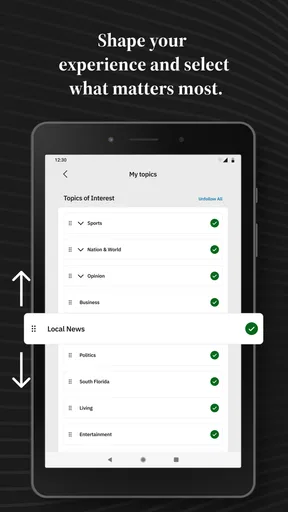
One of the standout features of this app is its real-time notifications. You can customize alerts based on your interests, ensuring you never miss out on important news. Whether it's a local political update or a major sports event, the app keeps you in the loop.
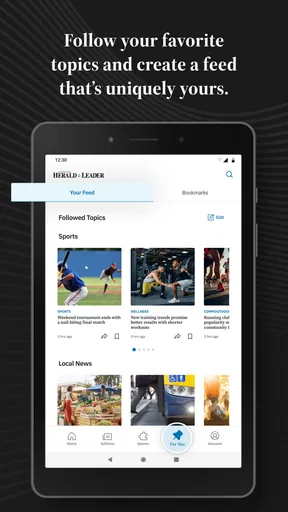
The search functionality is another highlight. It's incredibly efficient, allowing you to quickly find articles or topics you're interested in. The app also includes a bookmarking feature, which is perfect for saving articles you want to read later.
Now, let's talk about the multimedia content. The app offers a rich array of photos and videos that accompany most articles. This not only enhances the reading experience but also provides a more immersive way to understand the stories.
For a practical routine, I would use search when I already know the subject or name I am following, rather than repeatedly scrolling through the home screen. Bookmarks suit a different need: save a story when there is no time to finish it, then return to it during a quiet moment. Together, those habits make the app more useful for a busy reader than treating every visit as an attempt to read everything.
Usability and Design
The design is sleek and minimalistic, focusing primarily on readability. The font size is adjustable, which is a nice touch for those who prefer larger text. Navigating through the app feels seamless, with smooth transitions between sections.
Moreover, the app supports both light and dark modes. As someone who often reads news late at night, I found the dark mode particularly useful. It’s easy on the eyes, ensuring a comfortable reading experience even in low-light environments.
Those presentation options also help when the same device moves between readers with different preferences. A person who needs larger text can adjust it for comfortable reading, while someone checking the app at night may prefer the darker display. On a shared tablet, though, one reader’s preferred display setting may not suit the next person. If that becomes annoying, it is worth treating appearance as a personal preference to revisit rather than assuming one setting will satisfy everyone.
Content Quality
Of course, an app is only as good as the content it delivers, and the Herald-Leader - Lexington KY app doesn't disappoint. The journalism here is top-notch, with thorough reporting and well-written articles. The local focus is especially valuable, offering insights into community issues that might not get national attention.
In addition to local news, the app provides national and international updates, making it a comprehensive news source. The opinion pieces are thought-provoking, and the sports section is a must-visit for any Kentucky Wildcats fan.
The local emphasis is also the key trade-off when comparing it with a general news aggregator. An aggregator is often the better choice if you want to pull headlines from many publishers or follow a wide range of regions in one place. This app makes more sense when Lexington-area reporting is the reason you are opening a news app in the first place. For a reader who lives elsewhere but has family, work, or strong interests in the area, that local lens can be more relevant than a broader feed.
I would also separate “one place to start” from “the only place to check.” When a story has immediate practical consequences, such as an instruction that affects a household’s plans, I would read the reporting and then confirm the operational detail with the organization responsible. For routine awareness and context, a local publication is a helpful companion; for a definitive action or service update, a direct source may answer the specific question faster.
Who will get the most from it?
I would recommend the app most readily to Lexington residents who want local headlines in a familiar newspaper format, Kentucky sports followers who like a dedicated section, and former residents who still keep track of the area. It can also suit someone who does not want to build a complicated news setup and simply wants to check regional coverage at convenient points in the day.
It is less compelling for someone who wants a single feed customized across many cities and publishers, or for a reader who avoids paid options entirely and does not want to think about purchase boundaries on a shared device. The in-app purchase range makes it sensible to check the terms shown in the app before committing to anything. If all you need is a quick glance at headlines and you are satisfied with whatever is freely available, you can try the app first and decide whether its reading experience meets your needs.
For a household, I would agree on a simple division of labor: one person can keep an eye on local developments, another can use search for a specific topic, and anyone who wants to finish a longer story can bookmark it. That avoids duplicate browsing and gives each reader a clear reason to open the app. It also prevents a shared device from becoming a place where several people expect different account behavior without having discussed it.
Personal Experience and Conclusion
Using the Herald-Leader - Lexington KY app has become a daily ritual for me. Whether I'm sipping my morning coffee or winding down after a long day, it's my go-to for staying informed. The blend of local focus and broader news coverage makes it an indispensable tool for anyone living in or interested in the Lexington area.
In conclusion, if you're looking for a reliable and engaging way to keep up with the happenings in Lexington, this app is a must-try. The developers have done a stellar job of creating a user-friendly experience that caters to a wide audience. So, go ahead and give it a download. Trust me, you won't regret it!
My more measured recommendation is to try it when Lexington coverage is a regular need, then judge the app by the stories and reading routine that matter to you. The lower average rating is a useful reminder that individual experiences vary, so I would not promise that every reader will find the interface or access arrangements ideal. If it fits your device, your budget expectations, and your household’s approach to shared reading, it can be a handy local-news habit. If you mainly want a broad multi-source feed or dislike apps with in-app purchase options, another news source may be a better match.
Pros
- User-friendly interface with smooth navigation.
- Comprehensive local news coverage.
- Customizable notifications for updates.
- High-quality images and videos.
- Fast loading times with minimal lag.
Cons
- Limited customization for article layout.
- Ads can be intrusive at times.
- Offline mode is not fully supported.
- No dark mode option available.
- Occasional crashes on older devices.
FAQs for Lexington Herald-Leader | News
What is the Herald-Leader app?
The Herald-Leader app is a comprehensive news application providing the latest updates, top stories, and in-depth coverage of local events in Lexington, KY. It offers a user-friendly interface where you can customize news feeds and receive push notifications for breaking news. The app is available for both Android and iOS devices.
Is the Herald-Leader app free to use?
The Herald-Leader app is free to download and offers limited access to certain news articles. However, for unlimited access to premium content, users may need to subscribe to a digital subscription. This subscription provides full access to all articles, exclusive reports, and additional features within the app.
What features does the Herald-Leader app offer?
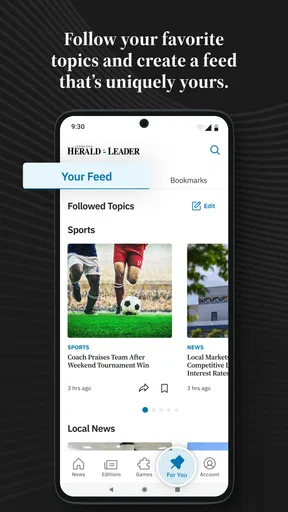
The app offers a variety of features including customizable news feeds, live updates, push notifications, and in-depth local reporting. Users can also bookmark articles for later reading, share stories on social media, and access multimedia content like photos and videos to enhance their news consumption experience.
How do I manage notifications in the Herald-Leader app?
Managing notifications in the Herald-Leader app is simple. Users can navigate to the settings menu within the app to choose which types of notifications they wish to receive, such as breaking news or specific topic alerts. This allows users to stay informed without being overwhelmed by constant updates.
How does the Herald-Leader app ensure user privacy?
The Herald-Leader app is committed to protecting user privacy. It adheres to strict privacy policies and data protection standards. Users can review the privacy settings within the app to understand what data is collected and how it is used, ensuring transparency and control over personal information.


